Mineland
New Recommended Games














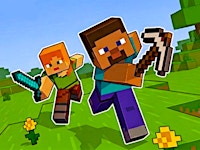
Mineland is a browser-based multiplayer sandbox game that delivers the quintessential block-building experience directly to your web browser without the need for any downloads or installations. Drawing heavy inspiration from the creative freedom and open-ended mechanics of Minecraft, Mineland offers a vast, procedurally generated voxel world where players can gather resources, craft tools, and construct anything their imagination conjures. Unlike story-driven titles, Mineland focuses purely on exploration, construction, and online cooperation. Whether you prefer to build a serene home, delve into hidden underground caves, or collaborate on massive community projects with other players, every session presents a new, unscripted adventure. The game is designed to be a fast, accessible, and free-to-play multiplayer alternative that maintains the core spirit of block-based sandbox gaming while optimizing for quick, hassle-free access on PC and Mac platforms. With a vibrant community and persistent servers, Mineland invites game enthusiasts to immerse themselves in an ever-evolving world where creativity is the only limit.
zombies and skeletons, requiring players to craft weapons and armor for survival. 5. Multiplayer Interaction – Join forces with other players to share resources, build communal projects, or engage in friendly competition. The game’s .io nature means you can easily find and join the same server as friends.
Mineland does not impose a fixed storyline, allowing players to set their own goals—whether that is constructing a towering castle, engineering complex redstone-like machines, or simply surviving the wilderness.
Server Selection and Build Persistence
Before investing significant time in a build, check the server’s rules regarding land claiming and world persistence. Some servers permanently save player structures, while others reset daily or weekly. Always read the lobby description or ask in chat to avoid losing progress.
Internet Connection
As a browser-based multiplayer game, Mineland relies on a stable internet connection. Lag can affect mining, block placement, and combat. For the smoothest experience, use a wired connection or a strong Wi-Fi signal. If latency spikes occur, try switching to a server geographically closer to you.
Account and Save Management
Mineland typically does not require an account to play. Progress is tied to the server and sometimes a session cookie. If you switch browsers or clear cookies, your builds may be lost on servers that do not support permanent account linking. For important projects, consider playing on servers that offer account-based land claiming.
Learning the Crafting Recipes
While many recipes are intuitive (e.g., wooden planks from logs), others are hidden. Use the in-game inventory crafting grid or consult community guides to discover advanced recipes for tools, armor, and redstone-like mechanisms. Experimentation is encouraged but can waste resources early on.
Survival Tips for New Players
Mobile Play
On touchscreens, precision building and fast combat can be challenging. Enable on-screen sensitivity adjustments if available, and practice double-tap controls for quick block placement. Consider using a tablet for a larger play area.
Security and Fair Play
Since Mineland is browser-based, avoid downloading any third-party mods or “enhancements” claiming to improve the game; they may compromise your system. Also, respect server rules—griefing (destroying others’ builds without permission) is often bannable. Report toxic behavior to moderators to maintain a positive community.
Health and Breaks
Sandbox games can be highly immersive. Set timers to take breaks, stretch, and rest your eyes. Prolonged sessions can lead to fatigue and reduced reaction times, especially during night-time survival phases.
A: Mineland is a browser-based multiplayer sandbox game that lets you gather resources, craft tools, and build anything you can imagine in a massive blocky world. It focuses on exploration, construction, and online cooperation without a fixed story, and you can play instantly without downloading anything.
A: Use the keyboard controls on PC or the on-screen joystick on mobile. Move with WASD, look around with the mouse, break blocks with left click, place blocks with right click, jump with Space, sneak with Shift, select hotbar items with 1-9, and open inventory with E. On mobile, use the joystick to move and tap action buttons to jump, mine, place blocks, and interact.
A: Press the W, A, S, D keys on your keyboard to move forward, left, backward, and right respectively.
A: Move your mouse to look around the world.
A: Left‑click on a block to break it. This also works as an attack action.
A: Right‑click to place a block from your hotbar.
A: Press the Space bar to jump.
A: Hold the Shift key to sneak.
A: Press number keys 1 through 9 to select the corresponding item in your hotbar.
A: Press the E key to open your inventory.
A: Use the on‑screen joystick to move, and tap the action buttons to jump, mine, place blocks, and interact.
A: No. The game is completely browser‑based. You can play the full 3D sandbox world instantly on your PC or Mac without installing any files.
A: It is heavily inspired by Minecraft and shares many core mechanics such as block building, mining, and crafting. However, it is designed as a fast, accessible, free‑to‑play multiplayer alternative that runs smoothly in a web browser.
A: Yes. It is a massive multiplayer online (.io) game, so you can join the same server as your friends and work together to build structures or survive as a team.
A: It depends on the server. Some servers allow you to claim land and save your builds, while others reset over time. Check the rules of the server lobby you join.
A: Recommended multiplayer sandbox games include:
Mineland’s gameplay loop is intuitive and instantly familiar to anyone who has experience with sandbox block games. Upon joining a server, you spawn into a procedurally generated world filled with diverse biomes, resources, and other players. The primary objectives are to gather raw materials, craft tools and items, and build structures—either alone or cooperatively.
Control Scheme (PC):
Control Scheme (Mobile):
Core Gameplay Loop: